Product preview · iOS

Dynero by Posterity Labs

Personal lending,
made clear.

Create a loan request, review the complete plan, track every scheduled payment, and keep the activity connected from start to finish.

Working demo Pre-launch Fictional data
Dynero screen for reviewing a 125 dollar borrow request before lending
Dynero active loan screen showing remaining balance and next scheduled payment
Clear termsBefore anyone commits
Full lifecycleRequest through repayment

How Dynero works

Five steps. One understandable loan record.

The screens below are authentic captures from the tested, offline iOS demo.

01

Request

Turn a conversation into clear terms.

Choose the amount, purpose, interest, payment frequency, and payment count. Dynero calculates the typical payment, total owed, and final due date before the request is created.

  • Plain-language amount and purpose
  • Visible interest and total owed
  • Calculated payment plan
Create request screen with amount, interest, payment count, and final due date
Fictional request shown in the product demo.
02

Review

See the repayment plan before lending.

The lender can review the borrower, purpose, principal, interest, cadence, final due date, and available demo balance before choosing to proceed.

  • Request code connects the flow
  • Terms remain visible before action
  • Borrowed and lent views stay distinct
Lender review screen with borrower, purpose, amount, interest, and schedule
Fictional lender workflow shown separately from the borrower workflow.
03

Track

Know the balance and what comes next.

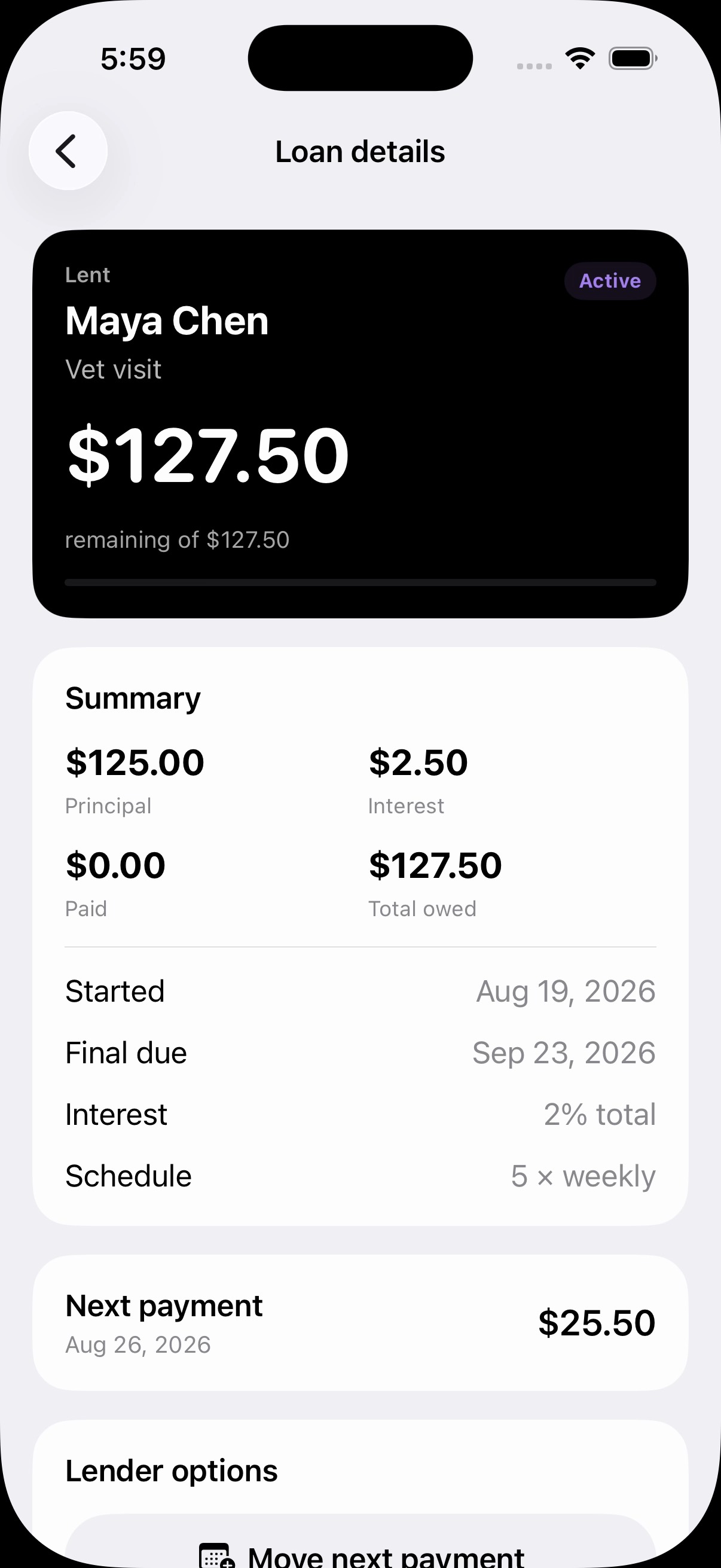
Loan details keep the original terms, current balance, paid amount, status, schedule, and next payment together instead of scattering them across messages.

  • Borrowed and lent loan portfolios
  • Current status and remaining balance
  • Next payment and due date
Active lent loan showing principal, interest, remaining balance, and next payment
Active-loan details from the working iOS demo.
04–05

Repay and record

Make the right payment and keep the receipt.

Dynero selects the calculated scheduled payment while still allowing a custom pay-ahead amount. After payment, the balance, schedule, loan list, and activity record update together.

  • Calculated regular payment
  • Custom pay-ahead amount
  • Timestamped activity detail and reference
Repayment screen with a 60 dollar regular payment selected
Repayment
Completed payment activity with status, timestamp, counterparty, and reference
Activity record

1 minute 50 seconds

Watch the complete product walkthrough.

The demo shows a borrower request, lender review and funding, an active loan, a scheduled repayment, and the resulting activity record.

Format H.264 · 1080p Source iPhone simulator Audio Silent · On-screen labels
Dynero product demo Product walkthrough · On-screen labels

The video uses fictional sample data and demonstrates on-device interactions. It does not show a live financial transaction.

Product stage

Pre-launch, with a working product demo today.

We are showing exactly what is built and keeping the production launch boundary explicit.

BuiltBorrowing, lending, loan schedules, repayment, activity, and fictional demo state.
ValidatedThe end-to-end demo workflow is tested, and the walkthrough was captured directly from that build.
NextProduction money rails, compliance review, approved disclosures, support operations, and public release.

Dynero

A clearer structure for lending between people who know each other.